Could not load file or assembly ‘System.EnterpriseServices.Wrapper.dll’

I had this error when running a .Net 3.5 app that is using a DB2 connector on a Win XP SP3 machine. The application has always worked until today and is in no way using the referenced assembly (just executing some select statements).

The full error reads:

System.IO.FileNotFoundException: Could not load file or assembly ‘System.EnterpriseServices.Wrapper.dll’ or one of its dependencies. The system cannot find the path specified.
File name: ‘System.EnterpriseServices.Wrapper.dll’ —> System.IO.FileNotFoundException: Could not load file or assembly ‘System.EnterpriseServices.Wrapper.dll’ or one of its dependencies. The system cannot find the path specified.
File name: ‘System.EnterpriseServices.Wrapper.dll’ —> System.IO.DirectoryNotFoundException: The system cannot find the path specified. (Exception from HRESULT: 0x80070003)

at System.EnterpriseServices.ContextUtil.get_IsInTransaction()
at System.Data.Common.ADP.IsSysTxEqualSysEsTransaction()
at System.Data.Common.ADP.NeedManualEnlistment()
at System.Data.Odbc.OdbcConnection.Open()
at MyFantasticApp.Program.Main(String[] args)

Googling for it recommended to repair the .Net 3.5 SP1 installation.

Result: It is working again!

Posted in .Net, Assembly | Tagged , , , | 2 Comments

FuslogVw–debugging assembly loading

We’ve all had it before: referencing some libraries, recompiling the project and then the variation on the DLL hell: the assembly hell.

Suddenly one of your assemblies (or on of its dependent assemblies) doesn’t load anymore.

Debugging this can be done by using FusLogVw: Start the VS command prompt as an administrator, type : FusLogVw and the “Assembly Binding Log Viewer” is shown. Click on the “Settings…” button to enable logging of assembly loading and test your program. If you don’t start the tool as an administrator you won’t be able to change the loggings settings, as some HKLM registry keys are updated for this.

The logging in the FusLogVw window isn’t live: you need to refresh from time to time to see some results. Now find the assembly that is causing troubles and double click on the line. This will explain how FusLogVw tried to resolve the path to your assembly. No indication is given on the line that it failed, you only find that information when you double click the line. On the other hand you probably have the name and version of the assembly that fails to load anyway, so this isn’t a real problem.

Maybe you need to adjust some bindingRedirects in your app.config file, or if it is for the whole system in the C:\Windows\Microsoft.NET\Framework\v2.0.50727\CONFIG\machine.config file.

<runtime>
    <assemblyBinding xmlns=”urn:schemas-microsoft-com:asm.v1″>
        <dependentAssembly>
            <assemblyIdentity name=”Microsoft.Practices.RecipeFramework” publicKeyToken=”b03f5f7f11d50a3a” culture=”neutral”/>
            <bindingRedirect oldVersion=”1.0.51206.0-1.3.0.0″ newVersion=”1.4.0.0″/>
        </dependentAssembly>

[ … ]

Posted in .Net, Assembly, Development | Tagged | Leave a comment

WCF – use a file in the App_Data folder

If your web service needs information from some external files, a logical place for these files is the App_Data folder.

To get the fysical path of the file in a WCF service you can use this code:

RolemappingPath = HostingEnvironment.MapPath(@”/App_Data/RoleMapping.xml”);

The class HostingEnvironment is in the namespace System.Web.Hosting, and you will also need to add a reference to System.Web.dll.

Reference: http://msdn.microsoft.com/en-us/library/system.web.hosting.hostingenvironment.mappath.aspx

Posted in Development | Leave a comment

WCF – Issue a request over https with custom header

In my current project I need to call a web service over https. Security is implemented by using a custom header (old school). To support this in WCF follow the following simple steps:

In the configuration file (app.config) make the following changes:

<client>
    <endpoint address=”https://…
        binding="basicHttpBinding" bindingConfiguration="MyHttpsBinding"
        contract="…" name="ACC">
        <headers>     <!—your custom header here  –>
            <credentials >
                <username>…</username>
                <password>…</password>
            </credentials>
        </headers>
    </endpoint>
</client>

Add a new binding:

<binding name="MyHttpsBinding">
    <security mode="Transport">
        <transport>
            <extendedProtectionPolicy policyEnforcement="Never" />
        </transport>
    </security>
</binding>

Posted in Development | Leave a comment

LINQPad tool

Perfect tool to try out all your LINQ queries! Needn’t say more!

http://www.linqpad.net/

Technorati Tags: ,,

Posted in Geen categorie | Leave a comment

CalendarExtender and Globalisation

By default the CalendarExtender isn’t aware of the Globalisation settings. Example:

<asp:TextBox ID="txtFrom" runat="server" Width="80px"></asp:TextBox>
<cc1:CalendarExtender ID="txtFrom_CalendarExtender" runat="server" TargetControlID="txtFrom" ClearTime="True">
</cc1:CalendarExtender>

Web.config:

<system.web>

[ … ]

<globalization uiCulture="nl-BE" culture="nl-BE" />

</system.web>

This will still not use the nl-BE culture. To get it working you must add the EnableScriptGlobalization="True" to the ScriptManager that you’re using.

<asp:ScriptManager ID="ScriptManager1" runat="server" EnableScriptGlobalization="True">
</asp:ScriptManager>

Source: http://forums.asp.net/p/1068187/1589941.aspx


Posted in Geen categorie | Leave a comment

CLR trigger – External access

By default when you create a CLR trigger, VS 2008 will deploy it as a SAFE trigger:

CREATE ASSEMBLY HelloWorld

FROM @SamplesPath + ‘HelloWorld\CS\HelloWorld\bin\debug\HelloWorld.dll’

WITH PERMISSION_SET = SAFE;


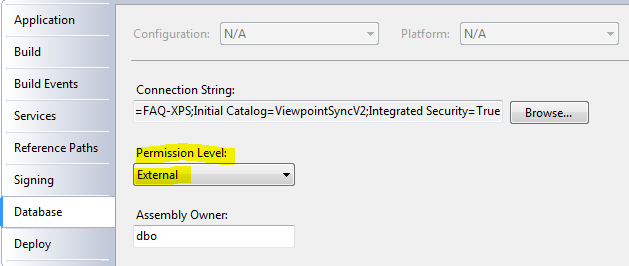
This is good, you always want to start with the minimal permissions but as in my previous example, when you want to work with the file system you’ll need the “external access” permission for your assembly.

The good news is that in the project properties you can set this very easy:

image


But the database server won’t accept this so easily. You’ll need to set the database in the Thrustworthy state.

It cost me a bit of searching but the way to do this is:

Use Master

alter database XYZ set trustworthy on


And now you can play.

Security warning: This setting is good for development, but in production circumstances you’ll need some other tricks. Next post when I have solved this problem!

Posted in Development | Leave a comment

CLR Trigger

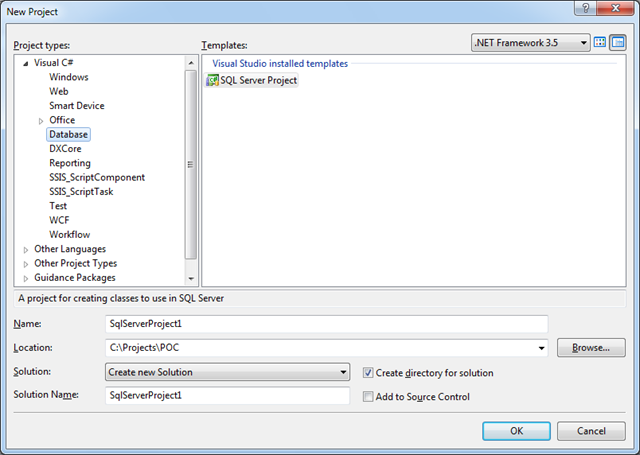
Creating a CLR trigger couldn’t be easier:

image

In VS 2008 Create a new SQL Server Project, then create a new trigger (right click project name, add, trigger.

Fill in the attribute’s properties:

[Microsoft.SqlServer.Server.SqlTrigger(Name = "PackageDeleteTrigger", Target = "Packages", Event = "FOR DELETE")]
public static void PackageDeleteTrigger()

and write your code, for example:

[Microsoft.SqlServer.Server.SqlTrigger(Name = "PackageDeleteTrigger", Target = "Packages", Event = "FOR DELETE")]
public static void PackageDeleteTrigger()
{
    // Replace with your own code
    SqlContext.Pipe.Send("Trigger FIRED");

    using (SqlConnection conn = new SqlConnection("context connection=true"))
    {
        conn.Open();
        using (SqlCommand cmd = conn.CreateCommand())
        {
            cmd.CommandType = CommandType.Text;
            cmd.CommandText = "select * from deleted";
            using (SqlDataReader rdr = cmd.ExecuteReader())
            {
                while (rdr.Read())
                {
                    string path = rdr.GetString(2);
                    string fullpath = Path.Combine(@"c:\temp", path);
                    File.Delete(fullpath);

                    SqlContext.Pipe.Send("Deleted file " + fullpath);
                }
            }
        }
    }
}

Running the project (F5) will compile it, and deploy the assembly to your SQL server. The test.sql script will be automatically executed. Of course you should make your code a bit more robust, checking for possible exceptions. Otherwise the CLR exception will pass to SQL server, and your record won’t be deleted. It will all depend on your situation whether this is good or bad.

I’ll discuss the security problems in the next post.

Posted in Geen categorie | Leave a comment

Windows 7 SendTo

When you rightclick on the start button and then choose “Explorer”, in previous versions of Windows this would take you to your own user profile folder. This contains a folder called “SendTo”, where you can (for example) add a shortcut to notepad.

I was looking for this folder in Windows 7, but it wasn’t visible in the explorer. When I tried to type it in the address bar of the explorer I got an “access denied” message.

The trick is now to type “shell:sendto” as a location. This will take you in the familiar folder to add your shortcuts.

I found this tip at http://www.pc-active.nl/special-windows-7/206943-windows-7-supertip-bestanden-snel-kopieren.html (in Dutch).

Posted in Geen categorie | 1 Comment

Create a new WCF log file after a certain size is reached

By default when you create a log file for your WCF service, this will be one file that will always grow. This makes it hard in the end to load the file in memory to check it out.

I found a nice implementation of a TraceListener that will create a new log file once a certain size is reached at http://www.codeproject.com/KB/WCF/RollingXmlWriterTraceList.aspx.

I’m using this unmodified in my current project now. Even better would be to create a new log file every day. I’ll implement this later, when I have time and I’ll adjust this post then.

Technorati Tags: ,

Posted in Geen categorie | Leave a comment