
In this blog we are going to find the matching items in 2 sorted collections. The algorithm is simple and effective. I will show you how to implement it in C# and make it generically (pun intended) available to all your collections. In other words: we’re going to make a generic extension method to make this a LINQ-like method.
The blog is not really about the algorithm, but more about how to write this as a LINQ extension method. Using this blogpost as an example you can write your own LINQ extension methods.
Table of contents
- Prerequisites
- Problem statement
- The algorithm
- The first small improvement
- Using .NET enumerators
- Making it generic
- Making it a LINQ extension method
- What, no F# in this blog?
- References
Prerequisites
The code samples are written in C#. I don’t explain the C# basics, but I will explain the steps between each code improvement. I used VS2026 and .NET 10 for the code samples, but you can use any code editor that you like.
The code for this blogpost can be found at https://github.com/GVerelst/ZipMatch.
Problem statement
Let’s say that we have 2 sorted collections list1 and list2. We want to find the matching elements in the collections. We want to make this fast as well.
The algorithm
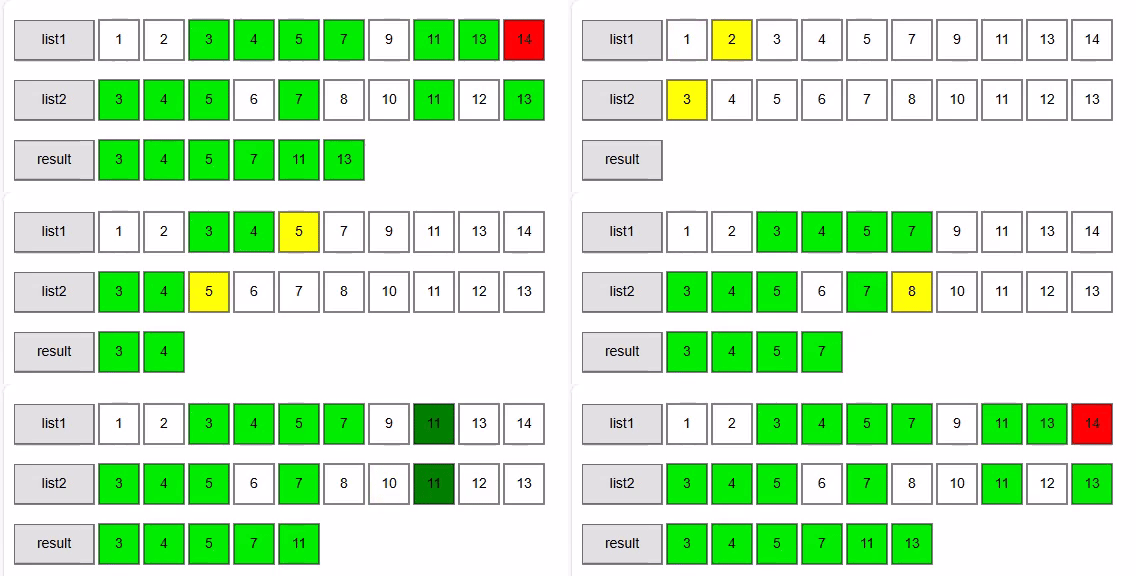
The algorithm that we are going to use is known as the Two-way merge Algorithm. As indicated before it works on 2 sorted collections. We start simple with 2 lists of integers.
/// <summary>
/// First version to explain how the algorithm works.
/// </summary>
/// <param name="sortedlist1"></param>
/// <param name="sortedlist2"></param>
/// <returns></returns>
public static List<int> ZipMatch1(List<int> sortedlist1, List<int> sortedlist2)
{
    List<int> result = [];
    int i1 = 0;
    int i2 = 0;

    while (i1 < sortedlist1.Count && i2 < sortedlist2.Count)
    {
        if (sortedlist1[i1] == sortedlist2[i2])
        {
            result.Add(sortedlist1[i1]);
            i1++;
            i2++;
        }
        else if (sortedlist1[i1] < sortedlist2[i2])
        {
            i1++;
        }
        else
        {
            i2++;
        }
    }

    return result;
}
We walk through both collections using i1 as an iterator in sortedlist1 and i2 as an iterator in sortedlist2. We start at the first elements in both lists.
Now we run over the lists until one of the lists runs out of items. This means that for the remaining items in the other lists cannot be a match anymore and we stop.
At each iteration in the loop we check if one of the items is smaller than the other one. If so, we move that pointer forward. If the elements match we return the element and we advance both pointers.
This makes a very efficient algorithm:
Time complexity: O(n+m), where n and m are the sizes of the two collections.
Space complexity: O(min(m, n)) because we are filling the result list.
Walkthrough for the example above
sortedlist1 = [1, 2, 3, 4, 5, 7, 9, 11, 13, 14]
sortedlist2 = [3, 4, 5, 6, 7, 8, 10, 11, 12, 13]
Walkthrough (step → i1:value, i2:value → comparison → action → matches)
- i1=0:1, i2=0:3 → 1 < 3 → advance i1 → matches: []
- i1=1:2, i2=0:3 → 2 < 3 → advance i1 → matches: []
- i1=2:3, i2=0:3 → equal → add 3, advance both → matches: [3]
- i1=3:4, i2=1:4 → equal → add 4, advance both → matches: [3, 4]
- i1=4:5, i2=2:5 → equal → add 5, advance both → matches: [3, 4, 5]
- i1=5:7, i2=3:6 → 7 > 6 → advance i2 → matches: [3, 4, 5]
- i1=5:7, i2=4:7 → equal → add 7, advance both → matches: [3, 4, 5, 7]
- i1=6:9, i2=5:8 → 9 > 8 → advance i2 → matches: [3, 4, 5, 7]
- i1=6:9, i2=6:10 → 9 < 10 → advance i1 → matches: [3, 4, 5, 7]
- i1=7:11, i2=6:10 → 11 > 10 → advance i2 → matches: [3, 4, 5, 7]
- i1=7:11, i2=7:11 → equal → add 11, advance both → matches: [3, 4, 5, 7, 11]
- i1=8:13, i2=8:12 → 13 > 12 → advance i2 → matches: [3, 4, 5, 7, 11]
- i1=8:13, i2=9:13 → equal → add 13, advance both → matches: [3, 4, 5, 7, 11, 13]
- i1=9:14, i2=10: (past end) → stop
Final result returned by ZipMatch1(List, List):
[3, 4, 5, 7, 11, 13]
The first small improvement
        /// <summary>
        /// Second version using yield return.
        /// Slightly faster and uses less memory.
        /// </summary>
        /// <param name="sortedlist1"></param>
        /// <param name="sortedlist2"></param>
        /// <returns></returns>
        public static IEnumerable<int> ZipMatch2(List<int> sortedlist1, List<int> sortedlist2)
        {
            int i1 = 0;
            int i2 = 0;

            while (i1 < sortedlist1.Count && i2 < sortedlist2.Count)
            {
                if (sortedlist1[i1] == sortedlist2[i2])
                {
                    yield return sortedlist1[i1];
                    i1++;
                    i2++;
                }
                else if (sortedlist1[i1] < sortedlist2[i2])
                {
                    i1++;
                }
                else
                {
                    i2++;
                }
            }
        }
As you can see, there is no result list anymore. We now use the yield return statement that will return the results one by one. This makes the code a bit more readable and more efficient. Yield return returns an IEnumerable producing matches as you enumerate.
We also make the result IEnumerable<int> instead of a List. This gives the compiler the liberty to implement yield return in the most efficient way. It is also necessary to be able to use yield return.
Using .NET enumerators
ZipMatch2 works with Lists because we are using indexes. But if we want to work with other types of collections we will need to change this.
Observation: we only need to be able to move forward in both lists. So a simple IEnumerator can do the job.
        /// <summary>
        /// Working with enumerators directly.
        /// More general as it works with any IEnumerable.
        /// </summary>
        /// <param name="sortedlist1"></param>
        /// <param name="sortedlist2"></param>
        /// <returns></returns>
        public static IEnumerable<int> ZipMatch3(IEnumerable<int> sortedlist1,
                                                 IEnumerable<int> sortedlist2)
        {
            IEnumerator<int> enumerator1 = sortedlist1.GetEnumerator();
            IEnumerator<int> enumerator2 = sortedlist2.GetEnumerator();

            bool hasValue1 = enumerator1.MoveNext();
            bool hasValue2 = enumerator2.MoveNext();

            while (hasValue1 && hasValue2)
            {
                if (enumerator1.Current == enumerator2.Current)
                {
                    yield return enumerator1.Current;
                    hasValue1 = enumerator1.MoveNext();
                    hasValue2 = enumerator2.MoveNext();
                }
                else if (enumerator1.Current < enumerator2.Current)
                {
                    hasValue1 = enumerator1.MoveNext();
                }
                else
                {
                    hasValue2 = enumerator2.MoveNext();
                }
            }
        }
As you can see, we changed the parameter types to IEnumerable instead of the very specific List class. The IEnumerable interface gives the semantics of a forward only (and read-only) cursor. The code is now a bit more complex.
- We first obtain the 2 enumerators using the
IEnumerable.GetEnumerator()function. This returns anIEnumerator<int>. - Using the
MoveNext( )function we move to the first element in both collections.MoveNext( )returns false when there are no more elements in the collection. - The
Currentproperty returns the item at the enumerator’s position. - i1++ now becomes hasValue1 = enumerator1.MoveNext();
i2++ now becomes hasValue2 = enumerator2.MoveNext();
We can now Zipmatch3 over any collection that implements IEnumerable, giving us a much broader and useful function than Zipmatch2.
Making it generic
We want the code to work with collections containing any data type, not only integers, so let’s play with C# generics.
        public static IEnumerable<(T, U)> ZipMatch4<T, U>(IEnumerable<T> sortedlist1,
                                                          IEnumerable<U> sortedlist2,
                                                          Func<T, U, int> compare)
        {
            IEnumerator<T> enumerator1 = sortedlist1.GetEnumerator();
            IEnumerator<U> enumerator2 = sortedlist2.GetEnumerator();

            bool hasValue1 = enumerator1.MoveNext();
            bool hasValue2 = enumerator2.MoveNext();

            while (hasValue1 && hasValue2)
            {
                if (compare(enumerator1.Current, enumerator2.Current) == 0)
                {
                    yield return (enumerator1.Current, enumerator2.Current);
                    hasValue1 = enumerator1.MoveNext();
                    hasValue2 = enumerator2.MoveNext();
                }
                else if (compare(enumerator1.Current, enumerator2.Current) < 0)
                {
                    hasValue1 = enumerator1.MoveNext();
                }
                else
                {
                    hasValue2 = enumerator2.MoveNext();
                }
            }
        }
This step is a bit bigger. To make the function useful we want to match items from 2 collections of possibly different classes. Because we don’t know the classes beforehand we use C# generics. sortedlist1 if of type T, sortedlist2 is of type U.
To make sense of the returned items, we now return tuples of matching items.
In the example with integers the sort was implicit in the int datatype, but the compiler cannot infer how to compare the different types T and U. That is why we need the compare function. This is a generic delegate that compares an object of class T with an object of class U and returns < 0 when obj1 < obj2, > 0 when obj1 > obj2, 0 when they are equal. In the rest of the code we now use this function for the comparisons.
Here is an example of how to use this function:
[Fact]
public void CustomComparer_WorksWithDifferentTypes()
{
    // Arrange
    var a = new List<string> { "1", "2", "10" };
    var b = new List<int> { 1, 2, 10 };

    // Act
    var res = ListUtils.ZipMatch4(a, b, (s, i) => int.Parse(s).CompareTo(i)).ToList();

    // Assert
    var expected = new List<(string, int)> { ("1", 1), ("2", 2), ("10", 10) };
    Assert.Equal(expected, res);
}
Making it a LINQ extension method
In the following versios of the function I changed the function signature such that the first parameter is this IEnumerable sortedlist1. I also added some error checking to make the function more robust. So here is the final version of our ZipMatch function:
        public static IEnumerable<(T, U)> ZipMatch5<T, U>(this IEnumerable<T> sortedlist1,
                                                          IEnumerable<U> sortedlist2,
                                                          Func<T, U, int> compare)
        {
            ArgumentNullException.ThrowIfNull(sortedlist1);
            ArgumentNullException.ThrowIfNull(sortedlist2);
            ArgumentNullException.ThrowIfNull(compare);

            var enumerator1 = sortedlist1.GetEnumerator();
            var enumerator2 = sortedlist2.GetEnumerator();

            var hasValue1 = enumerator1.MoveNext();
            var hasValue2 = enumerator2.MoveNext();

            while (hasValue1 && hasValue2)
            {
                if (compare(enumerator1.Current, enumerator2.Current) == 0)
                {
                    yield return (enumerator1.Current, enumerator2.Current);
                    hasValue1 = enumerator1.MoveNext();
                    hasValue2 = enumerator2.MoveNext();
                }
                else if (compare(enumerator1.Current, enumerator2.Current) < 0)
                {
                    hasValue1 = enumerator1.MoveNext();
                }
                else
                {
                    hasValue2 = enumerator2.MoveNext();
                }
            }
        }
And here is how you call it using the “LINQ way”:
        [Fact]
        public void CustomComparer_WorksWithDifferentTypes()
        {
            // Arrange
            var a = new List<string> { "1", "2", "10" };
            var b = new List<int> { 1, 2, 10 };

            // Act
            var res = a.ZipMatch5(b, (x, y) => int.Parse(x).CompareTo(y)).ToList();

            // Assert
            var expected = new List<(string, int)> { ("1", 1), ("2", 2), ("10", 10) };
            Assert.Equal(expected, res);
        }
What, no F# in this blog?
You made it to the end. But you know that I like F# so here is some bonus code for you:
let rec zipMatch sortedlist1 sortedlist2 =
    if sortedlist1 = [] || sortedlist2 = [] then
        []
    else
        let h1::t1 = sortedlist1
        let h2::t2 = sortedlist2
        if h1 = h2 then
            h1 :: zipMatch t1 t2
        elif h1 < h2 then
            zipMatch t1 sortedlist2
        else
            zipMatch sortedlist1 t2


printfn "%A" (zipMatch [1;3;4;6;7;9] [0;2;4;5;6;8;9])
References
https://www.baeldung.com/cs/2-way-vs-k-way-merge
https://learn.microsoft.com/en-us/dotnet/csharp/language-reference/statements/yield
https://learn.microsoft.com/en-us/dotnet/api/system.collections.ienumerator?view=net-10.0
https://learn.microsoft.com/en-us/dotnet/csharp/fundamentals/types/generics
https://learn.microsoft.com/en-us/dotnet/csharp/language-reference/builtin-types/value-tuples
https://learn.microsoft.com/en-us/dotnet/api/system.func-2?view=net-9.0
https://learn.microsoft.com/en-us/dotnet/csharp/linq/how-to-extend-linq





 If you don’t have an Azure account yet, there are some ways to get a free test account. You can surf to
  Sysprep can be used with parameters (when you know what you are doing), or just without parameters, which will pop up a little form. In the screenshot, you can see the form with the right values filled in:








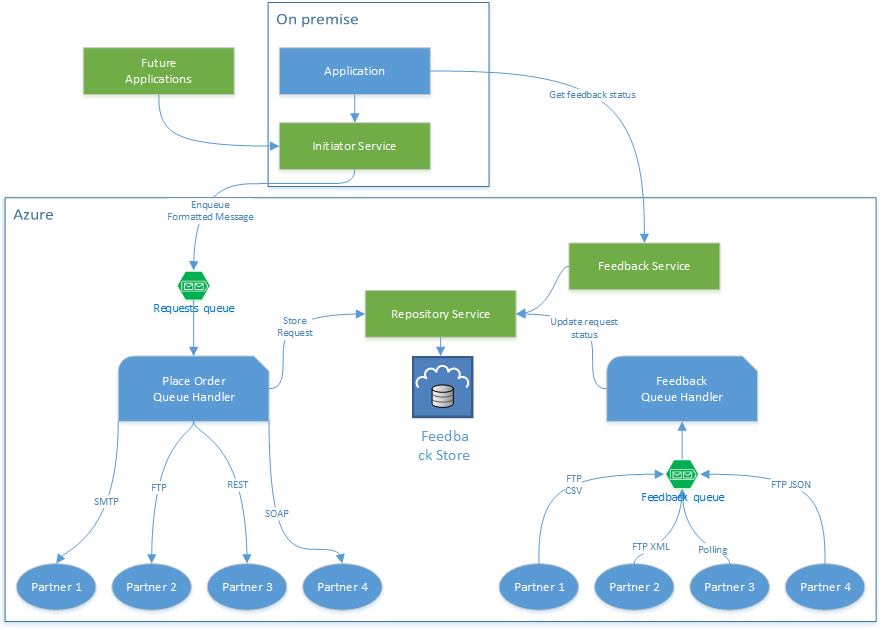
 I started working on a C# project that will communicate requests to several different partners, and receive feedback from them. Each partner will receive requests in their own way. This means that sending requests can (currently) be done by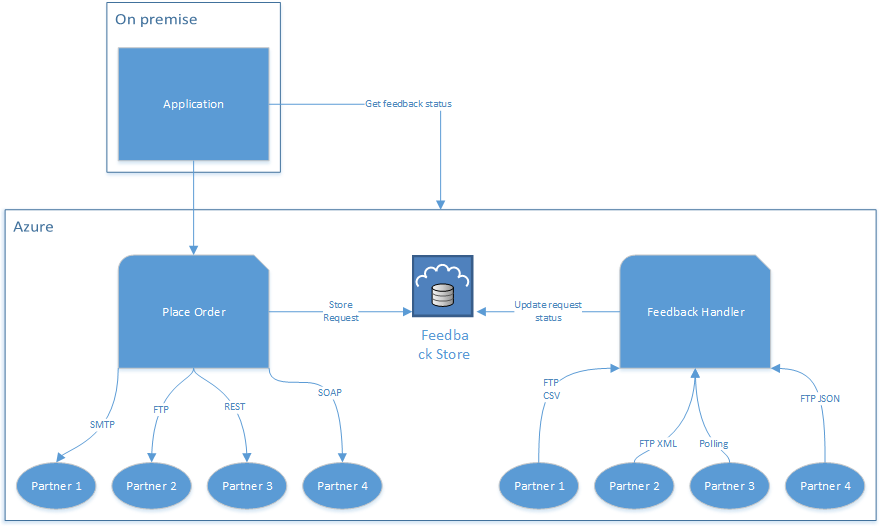



 . This string will be literally returned to the browser when this page is requested. Of course we could have gone through the trouble of creating a view, but let’s keep things simple in this demo.


 MSDev.pro blog